The approval workflow platform, feature by feature.
Every capability in one list, the real processes built on it, and the ways you can deploy and sign in. Use it to check fit before a demo.
What you get, grouped the way buyers compare.
Every item below is in the product today.
Workflows & approvals
- Visual workflow engine with sequential, parallel and conditional steps
- Multi-level approvals, committee votes and quorum rules
- Maker-checker (four-eyes) on any sensitive action
- Delegation, reassignment and correction routing
- SLA timers, reminders and escalations
- Kanban and list views of work in progress
Forms & data
- Drag-and-drop form builder with wizards and repeatable sections
- Validation, conditional fields and computed values
- File uploads attached to the record
- Master data and hierarchies (entities, branches, products)
- Public intake forms that start a process without a login
- Data pipelines that keep records in sync
Governance & security
- Attribute-based access control, deny by default
- Permissions per screen, action and field, scoped by hierarchy
- Tamper-evident audit trail with field-level before and after
- Audit log console with search, date filters and CSV export
- Single sign-on with Google, Microsoft or SAML
- Tenant isolation and regional data residency
Dashboards & reports
- Dashboards with KPI tiles, bar, line and pie charts, and tables
- Built on the same live records the workflows write
- Visual query builder with one filter bar across every widget
- Drill-down from a number to the records behind it
- Per-role visibility, down to individual widgets
- Reports with CSV export, scheduled exports and threshold alerts
Documents & communication
- Documents generated from templates (letters, memos, sanction notes)
- Built-in e-signature
- Email notifications and templates at every step
- In-app notifications and task inbox
Integration & automation
- REST API and webhooks (documentation provided to authorised tenant users)
- Channels: another system or your website starts a governed workflow
- Machine-to-machine service accounts with their own roles
- Scheduled jobs and a monitoring console for failed operations
The screens your team works in.
Dashboards, workflow designer, form builder, roles, channels and the audit trail. Shown with demo data.
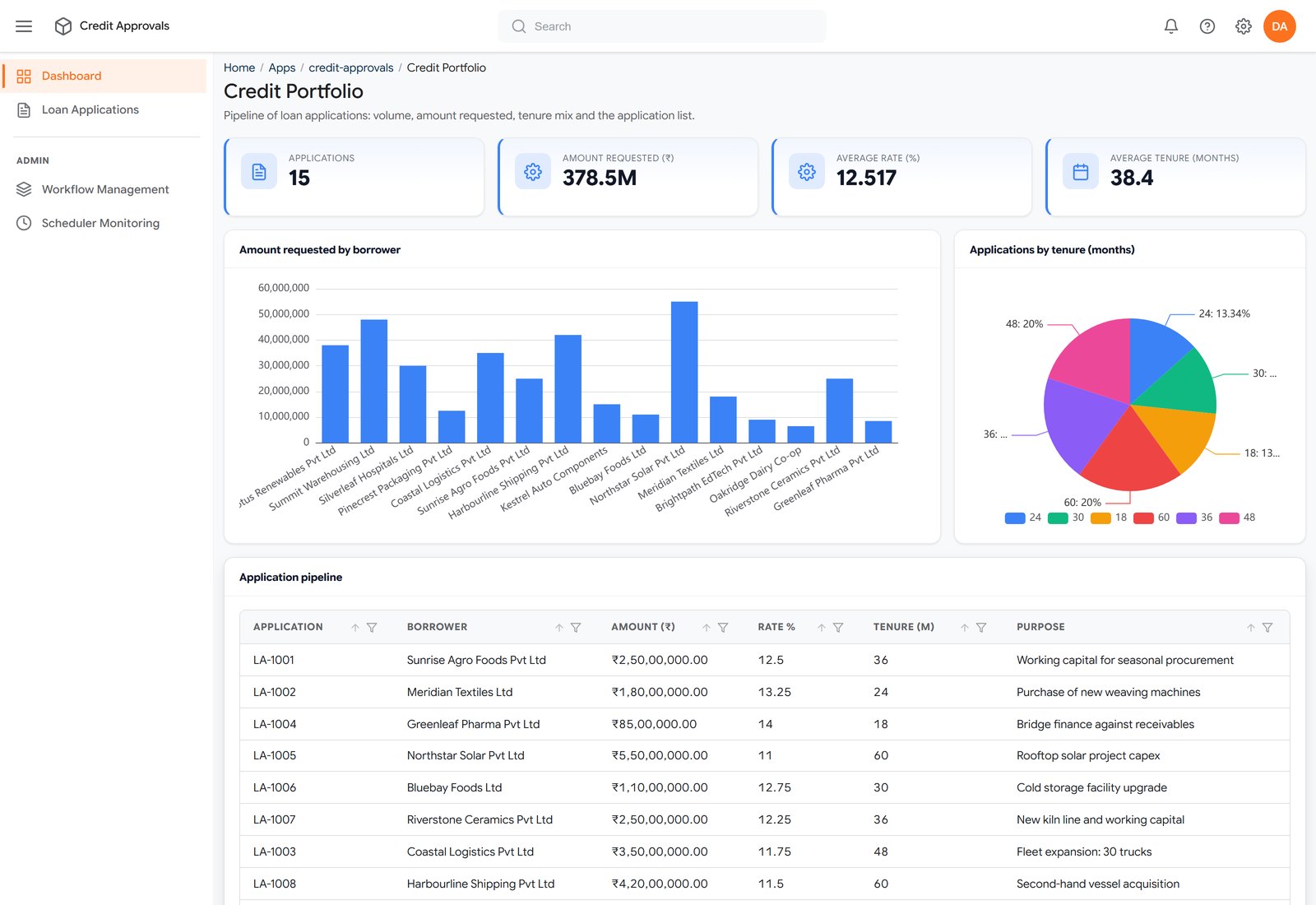
Dashboards — Live totals, charts and the pipeline table, built on the same records the workflow writes.
Real processes, and the features each one uses.
The same building blocks, assembled differently for each process.
Loan approval workflow
A loan or deal moves from intake to sanction through approval levels, with documents attached and every decision recorded.
Credit and investment committee
Committee members review the proposal and approve under quorum rules, and the decision is recorded with who approved and when.
Purchase order approval and invoice matching
A purchase requisition becomes a PO, the PO is released through value-based approval tiers, and the invoice is matched against the PO and goods receipt before payment is cleared.
Vendor onboarding
A vendor submits details and documents through a form, checks run, and the right people approve before the vendor goes live.
Cloud, private cloud or on-premise.
Same platform, same audit trail, wherever it runs.
Cloud (SaaS)
Hosted on AWS with regional data residency. Free plan for one application and three users.
Private cloud
A dedicated environment in your cloud account or region.
On-premise
Installed in your own data centre when policy requires it.
Web and mobile
Responsive web plus native Android and iOS apps for approvals on the move.
Sign-in
Single sign-on with Google, Microsoft or SAML; branded login on your own domain.
Languages
Multi-language interface for teams across regions.
What a customer says.
“At UTI Alternatives, managing our investments in primary NCDs and private equity requires precise process documentation and flawless audit readiness. Enterprise SaaS platforms from large MNCs proved both cost-prohibitive and too rigid for our bespoke requirements. Averoic solved this by developing a robust platform tailored to our entire investment lifecycle.”
Platform questions buyers ask.
What can the Averoic platform do?
Averoic runs business processes as governed workflows: forms, multi-level and parallel approvals, maker-checker, attribute-based access control, a field-level audit trail, live dashboards, document generation with e-signature, email notifications, a REST API and webhooks. Processes are configured without code.
Which processes run on Averoic today?
Loan approvals and credit and investment committees run in production at a SEBI-registered alternative investment manager. Purchase order approval with invoice matching and vendor onboarding are built and tested end to end on the same platform.
How does the AI builder work?
You describe a process in plain language and the AI assistant sets up the forms, workflow steps, roles and dashboards for you to review. Everything it creates uses the same permissions and audit trail as the rest of the platform.
How can Averoic be deployed?
As cloud SaaS on AWS with regional data residency, in a private cloud, or on-premise. It runs in any browser and has native Android and iOS apps.
Does Averoic support single sign-on?
Yes. Averoic supports single sign-on with Google, Microsoft and SAML identity providers, and a branded login on your own domain.
Does Averoic have an API?
Yes. Averoic has a REST API and webhooks, and channels let another system start a governed workflow. API documentation is provided to authorised users of a customer’s tenant.
Is Averoic no-code or low-code?
It is configured, not coded. Business teams assemble processes from forms, workflows, roles and dashboards without writing application code, and change them the same way.
Why configure instead of build.
The same capability without code to write, wait for and maintain.
| Custom build | Generic low-code | Averoic | |
|---|---|---|---|
| Time to live | Months to years | Weeks, configured | Weeks, configured |
| Who changes it later | A developer or vendor | Usually IT | Your own team |
| Audit trail | Bolted on, partial | Varies by module | Built in, on every action |
| Access control | Custom, inconsistent | Role-based | ABAC, deny by default |
Guides: Maker-checker process · Audit trail requirements · Delegation of authority matrix · Covenant monitoring
Start building on your process.
Spin up a free workspace in minutes — no card. Or book a 30-minute walkthrough on your real workflow.